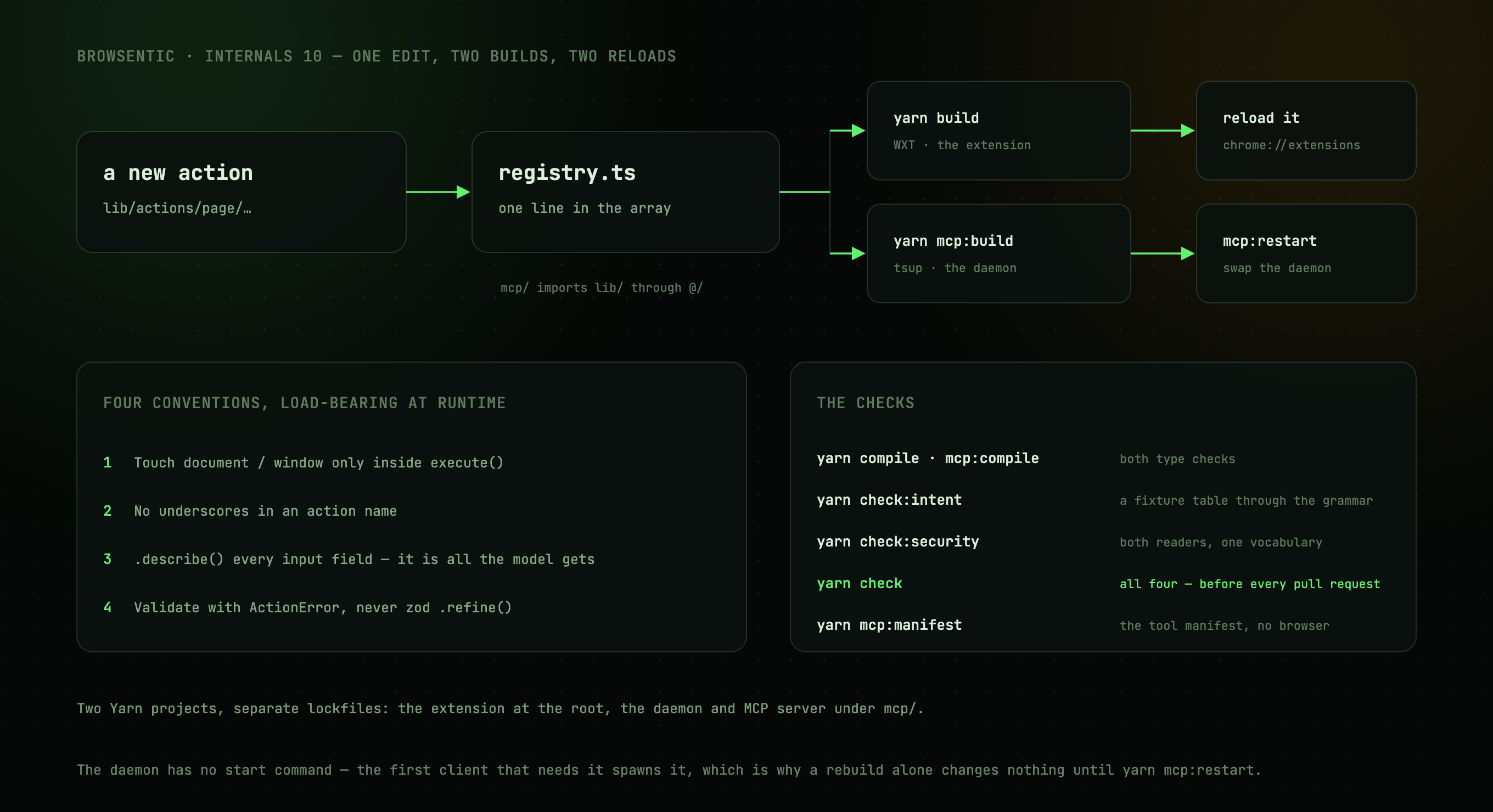
Two Yarn projects
Each has its own lockfile.
| Extension | Daemon + MCP | |
|---|---|---|
| Root | / |
/src/daemon |
| Bundler | WXT (Vite) | tsup |
| Output | dist/chrome-mv3 |
src/daemon/dist |
| Stack | React 19, Tailwind v4, shadcn/ui, zod | Node ≥20, @modelcontextprotocol/sdk, ws, zod |
| Build | yarn build |
yarn daemon:build |
src/daemon/ imports src/lib/ through the @/ alias, which is how one registry ends up in two
bundles.
node scripts/setup.mjs (yarn setup) runs all four steps (both installs, both builds) with the
Yarn release vendored in the repository, so a fresh clone needs only Node on PATH.
Commands
yarn dev              # build, launch a throwaway Chrome profile, hot reload
yarn dev:firefox
yarn build            # production build
yarn zip              # store-ready archive
yarn lint:firefox     # what addons.mozilla.org's validator will say about dist/firefox-mv2
yarn sign:firefox     # have addons.mozilla.org sign dist/firefox-mv2 (needs the AMO keys; see below)
yarn compile          # type check the extension
yarn daemon:compile      # type check the daemon
yarn daemon:dev          # rebuild the daemon on change
yarn daemon:restart      # rebuild, then swap the running daemon for the fresh build
yarn daemon:manifest     # print the tool manifest, no browser needed
yarn test             # every test; pass a path to run fewer
yarn test:integration # only the tests that start a real daemon
yarn coverage         # the tests, then coverage by area against its floors
yarn check:intent "<utterance>"   # how the local grammar routes one instruction
yarn check            # both type checks, then the tests and their coverage floors
Run yarn check before opening a pull request. If you touched the action registry, also run
yarn daemon:manifest and keep reference/tools.md in step with what it prints.
The daemon keeps the old build in memory
The daemon starts on demand: the first CLI command or MCP client that needs it spawns it,
browsentic start starts it explicitly, and the extension can ask the native host that
browsentic setup registered to start one. It lives until browsentic stop or 30 idle minutes with
nothing attached.
So a rebuild alone changes nothing while a daemon is running. yarn daemon:restart rebuilds,
stops the stale daemon and brings up the fresh build.
Signing a Firefox build by hand
The release workflow signs every tagged build through addons.mozilla.org and attaches the .xpi,
so this is only for checking a change against Mozilla's signer before a release. Two things make it
unlike any other build step:
-
AMO signs a version once per add-on id, ever. A signed version number is spent even if the file is thrown away. Never sign the version in
package.json; patch a fourth part onto the built manifest instead, which leaves the real number for the release:yarn build:firefox node -e 'const p="dist/firefox-mv2/manifest.json",m=require("./"+p);m.version+=".1";require("fs").writeFileSync(p,JSON.stringify(m))' export WEB_EXT_API_KEY='user:…' # addons.mozilla.org → Developer Hub → Manage API Keys read -s 'WEB_EXT_API_SECRET?AMO secret: ' && export WEB_EXT_API_SECRET yarn sign:firefox -
Unlisted means self-hosted. The signed file installs in release Firefox from
about:addonsand updates from theupdate_urlin wxt.config.ts, which points at the latest GitHub release. A build signed by hand therefore updates itself to the next release too.
yarn lint:firefox runs the same validator first, with no keys; it should report no errors and no
notices. The warnings it does report are the bundle's Function and innerHTML uses, plus one
about Firefox for Android, which learned the data-collection key two versions after desktop and
which this build does not target. The automated signer accepts all of them.
Adding a capability
Write src/lib/actions/page/<name>.ts and add it to the array in src/lib/actions/registry.ts. That single
edit publishes it as a page tool, because the daemon bundles the same registry.
Four conventions are load-bearing at runtime rather than at compile time:
- Touch
document/windowonly insideexecute(). The module is also imported by the daemon, where there is no DOM. - No underscores in action names. They break the tool-name round trip.
.describe()every input field. The text becomes the tool's JSON Schema documentation, and it is all the model gets.- Validate with
ActionErrorinsideexecute(), not zod.refine()/.transform(), which do not survive JSON Schema conversion.
Then rebuild both halves and reload the extension at chrome://extensions. Chrome does not
auto-reload unpacked extensions, and a stale service worker is the usual cause of a drifted manifest.
If the capability is consequential
Add a rule to src/daemon/guardrails/policy.ts rather than a
check inside the action, so the policy stays printable and diffable in one place. If it needs a new
predicate, add it to CONDITIONS; the vocabulary is closed on purpose.
If it should be reachable from the side panel without an agent
Add a rule to src/lib/intent/grammar.ts and a case to the table in
route.test.ts. Bias toward escalating (see
the intent funnel).
Adding an agent runner
One file in src/daemon/agent/runners/ plus one line in
runners/index.ts. The shared driver does the spawning, abort wiring and line reading; your runner
decides what to say and how to read the answer back.
You must also add a CONTAINMENT entry in
src/daemon/guardrails/spawn.ts declaring which containment mode
that CLI supports and what its plan must carry. vetPlan() refuses to spawn a runner whose plan does
not match, and spawn.test.ts asserts that without
spawning anything. Those tests walk every agent in the catalog, so a new runner is covered the moment
it exists; add tampering cases for the flags its containment depends on.
See also
- The action registry: why the manifest cannot drift silently
- Guardrails: where enforcement lives
- reference/tools.md: the page to keep in step