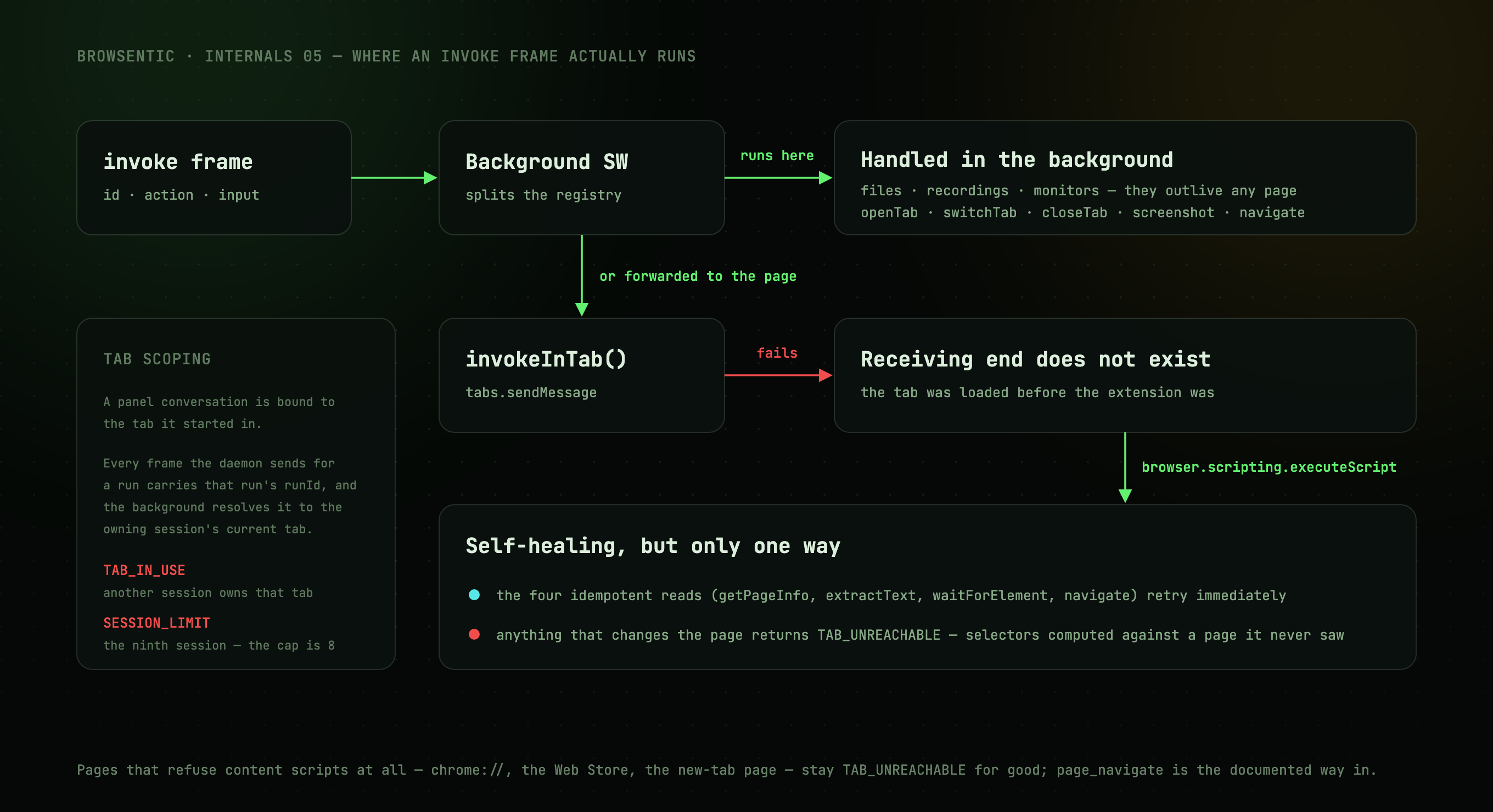
Background vs content script
Not every capability can run in the page, so the background service worker keeps some for itself:
| Handled entirely in the background | Why |
|---|---|
listFiles, attachFile, listRecordings, readRecording |
The data lives in extension storage |
startMonitor, monitorStatus, awaitMonitor, stopMonitor |
Monitors outlive any single page |
startDiagnostics, readConsole, readNetwork, stopDiagnostics |
The debugger attaches to a tab, and the buffers outlive any single page |
openTab, switchTab, closeTab, screenshot, navigate |
Need the tabs/scripting APIs |
| Everything else | Forwarded to the content script |
Nine of those need Chrome's debugger API, which Firefox has no counterpart for: trustedClick,
the two captcha tools, the four diagnostics tools, injectCode and runCode. Each is marked
chromiumOnly in its module, and describeActions('firefox') leaves them out, so a Firefox build
never lists them. The agent there is offered a shorter list, and the daemon knows that list by its
hash and reports it as in sync. The actions themselves stay registered on both builds: a stale
skill that names one is answered with UNSUPPORTED and a hint, not UNKNOWN_ACTION. The
build-time branch lives in one place, describeOwnActions() in src/lib/bridge/own-actions.ts;
the registry itself never reads import.meta.env, because the daemon bundles it under Node.
The microphone is granted from a tab
Chromium anchors a permission prompt to a tab. A side panel and a popup have none, so
getUserMedia there is refused without asking, and no manifest permission grants the microphone to
an extension. use-speech.ts therefore reads navigator.permissions first. On prompt it never
calls getUserMedia (repeated silent refusals would earn the origin a temporary block) and offers
Allow microphone instead, which opens the unlisted mic-permission.html entrypoint in a tab,
where the prompt can appear. The grant belongs to the extension's origin, so the panel, the popup
and hands-free mode's offscreen page all see the PermissionStatus change and start listening
without a reload. Firefox prompts from its sidebar on its own and skips the check.
The Firefox build and its gecko block
yarn build:firefox produces a Manifest V2 extension from the same source, and its manifest carries
a browser_specific_settings.gecko block the Chrome build has no use for:
id: browsentic@browsentic.com: addons.mozilla.org signs nothing without a permanent id, and the first signing bound this one to the project's AMO account for good. Changing it would make every installed copy a different add-on.update_url: theupdates.jsonunder the latest GitHub release. Every signed build carries this URL, so moving it means every older install stops updating; the release job publishes the file next to each signed.xpi.data_collection_permissions: websiteContent: Firefox shows this at install. It is the honest declaration: what the agent reads on a page leaves the browser for the daemon and reaches the model behind whichever agent CLI the user runs.strict_min_version: 140.0: the first Firefox that understands the data-collection key.
Four permissions are filtered out of that build (sidePanel, debugger, offscreen and
userScripts): the Firefox Manifest V2 build has no use for any of them, and AMO's validator flags
each name it does not know. The Firefox sidebar is sidebar_action, which WXT derives from the same
entrypoint, and the nine tools that need the debugger are left off the list a Firefox build offers
(see Background vs content script).
Self-healing injection
The forwarding call is invokeInTab(). A tab that loaded before the extension did has no content
script, so tabs.sendMessage fails with Receiving end does not exist. The extension then injects
the content script via browser.scripting.executeScript and:
- for the four idempotent reads (
getPageInfo,extractText,waitForElement,navigate) retries immediately; - for anything that changes the page returns
TAB_UNREACHABLEwith instructions to re-snapshot first, because the caller's selectors were computed against a page it has not actually seen.
onInstalled also sweeps every open, non-discarded tab and injects there, so a fresh install does
not leave a browser full of unreachable tabs.
Pages that refuse content scripts entirely (chrome://, the Web Store, the new-tab page) stay
TAB_UNREACHABLE permanently. page_navigate still works there through the tabs API, which is why
it is the documented escape hatch.
The panel's tabs
PanelNav owns the tab strip: Chat, History, Skills, Recordings, Schedules.
Adding one takes an entry in PANEL_TABS (which PanelTab is derived from), an entry in TABS and
RAIL_TABS, and a branch in the side panel's body; there is no router. A stored tab that is no
longer in PANEL_TABS (settings, from before it moved out) opens on Chat.
The strip shows as many labels as fit. A ResizeObserver measures the width the labelled row
needs and steps through three fits: every label, then only the open tab's, then icons alone with a
dot where the count chip was. A width is only knowable while it is on screen, so each fit records
its own and steps one rung down; stepping back up waits for the width it already learned, which
keeps the strip from flapping between two fits at one panel width. In practice five labels want
~485 px and one wants ~225 px, so a side panel at its usual size lands on the middle fit.
The settings page
Settings are not a panel tab. They are the extension's options page, entrypoints/options/, which
WXT turns into options_ui with open_in_tab on both browsers. So it needs no permission, Chrome
lists it as Options on the toolbar icon's menu, and Firefox as Preferences in about:addons.
The panel's header, the popup's header and the connection sheet open it with
runtime.openOptionsPage(), which focuses a settings tab already open instead of adding another.
The page is a sidebar of seven sections (Extension, Profile, Guardrails, Blocked sites, Agent, Connection, About),
with the open one in the URL hash, so a reload or a link lands on it; an unknown hash,
such as the old #appearance, lands on Extension. Agent and Connection are the same
AgentPicker and DaemonLink the popup and the connection sheet show; those keep their copies, so
a blocked run is still one click from its fix.
Extension is the theme, then what belongs to this browser alone, in storage.local: the
right-click items (browsentic/contextMenu), the keyboard shortcuts, and hold to talk
(browsentic/pushToTalk, the switch the orb's menu writes too). The shortcuts are the manifest's
commands, declared from shortcuts.ts with suggested keys. The
page lists them with commands.getAll(), re-read whenever it comes back into view, because the
browser owns the keys and only its own page changes them: chrome://extensions/shortcuts
(edge:// on Edge), or commands.openShortcutSettings() on Firefox.
Blocked sites is the one section the daemon never sees. Its list is browsentic/blockedSites in
storage.local, written only by useBlockedSites() on this page, and no socket frame carries it in
either direction: its purpose is to bind the agent, so it cannot live on the agent's side of the
socket. It is enforced in the extension, in three layers:
- The gate at the top of
invokeForHarness(invoke.ts) checks the target tab'surlandpendingUrl, every frame on the focused path, and where the action would send the browser (navigate,captureDownload). It is written as a list of exemptions (actions that touch no tab, andopenTab/switchTab/closeTab, which check the tab they pick in tabs.ts), so an action added later is gated without anyone remembering to. It also refuses any tab that is not an http(s) page, which keeps the debugger-backed actions off the extension's own pages. After the action, the tab is checked again, and a result from a tab that landed somewhere blocked is replaced by the refusal. - The content script re-checks its own frame's
location.hrefbefore dispatching (host.ts). - Everything that does not pass through the gate checks for itself through site-guard.ts: the scheduled-task tab, saved tools and their user scripts, A-Eye, the recorder, monitors and diagnostics (which also end when their tab moves onto a blocked site, or the list changes under them), recordings offered to the agent, and the run start, which drops the tab's URL and the picked element.
The list is read from storage on every check (a woken worker's memory is not the truth), and a value that is not a list refuses every web page, not none. The pattern grammar is in blocked-sites.ts, one RegExp per pattern so that a user script can carry the ones for its own origin.
About reads, writes and sends nothing. Its links and the bug report's URL come from
src/lib/about.ts, which the Windows app shares; the Mac app keeps the same
in About.swift. The versions are the manifest's, the build target (import.meta.env.FIREFOX), the
daemon's from DaemonState, SOCKET_PROTOCOL_VERSION, the active agent, the browser's release
(userAgentData.brands, or runtime.getBrowserInfo() on Firefox) and runtime.getPlatformInfo().
Report a bug opens the bug_report.yml issue form with those in its environment and agent
fields; nothing leaves the browser until the reader submits it on GitHub.
The theme and Guardrails are shared with the Mac app, and the daemon keeps both in
~/.browsentic/config.json:
- Two bridge ops,
preferencesandsetPreference, forward to the socket frames of the same name. The answer,preferencesInfo, is also pushed on connect and after every change to the file, whoever made it, and lands inDaemonState.preferences. The guardrail section renders that, so a row flipped in the Mac app moves here without a reload. - The theme stays in
storage.localtoo, because every surface paints from it before any socket exists.servePreferences()in preferences.ts keeps the two in step:- A push writes the daemon's theme locally.
- A local pick is sent up, unless it only echoes the push.
- A pick made while the daemon could not be told sets
browsentic/theme.unsynced, and wins at the next connect. So does a pick made before the browser was ever paired, when config.json names no theme yet.
Themes
A theme is one block of raw tokens in globals.css: grounds, inks, lines, the six named colours,
and four dials (--wash, --grain, --neon, --glow) that the utilities read instead of naming a
colour themselves. daylight sets --grain and --neon to nothing because film grain and a neon
halo only exist on black. The semantic tokens the shadcn primitives read are mapped once,
afterwards, from whichever block won, so a theme is that block and no more.
The blocks hang off [data-theme] instead of :root, and the attribute is scoped, not global.
Put it on a swatch and that subtree renders in the theme it advertises, which is how the picker
draws four live previews with no second copy of the palette. Only raw tokens re-resolve that way
(bg-ground, bg-brand); the semantic ones (bg-background, border-border) are computed at
:root and inherit, so a scoped preview must not use them.
browser.storage.local under browsentic/theme is the truth, read by useTheme(). It answers a
tick after the page has painted, though, which on a light theme means a dark flash every time the
popup opens. So mountTheme() applies a localStorage mirror of the same id synchronously before
React mounts, and lets storage correct it a moment later. index.html carries
data-theme="ember" and an inline ground so the frame before the stylesheet is neither white nor
unpainted; applyTheme clears that inline colour, since an inline colour outranks every rule and
would otherwise pin <html> to a dark ground under a light theme.
Minimizing: the rail lives in the page
Nothing can resize a side panel. chrome.sidePanel offers open, close, setOptions and
getLayout, and PanelLayout carries only side; the width is the user's, dragged and remembered
by Chrome. Collapsing the panel into itself would only leave an empty column, so minimizing
closes the panel and draws a 44 px rail into the page, a surface the extension can size.
src/lib/rail/events.ts |
The channel, the RailView the background computes, the tab list with its Lucide paths copied out, and one palette per theme spelled in oklch |
src/lib/rail/host.ts |
exposeRail() in the content script: builds the rail in a closed shadow root on documentElement |
src/lib/bridge/rail.ts |
serveRail() and syncRail() in the background: what to paint, and when |
src/lib/bridge/panel-view.ts |
browsentic/panelCollapsed and browsentic/panelTab, read by use-panel-view.ts in the panel |
The content script carries no React and no icon package, which is why the paths and colours are
copied, not imported: src/extension/components/ would drag the whole panel bundle onto every page.
For the same reason, the rail is the one place a theme is spelled twice. It has no stylesheet to
read globals.css from, so RAIL_PALETTES and RAIL_TONES carry an entry per [data-theme]
block, RailView carries the id, and describeRail() reads browsentic/theme alongside everything
else. The same storage.local.onChanged listener that repaints the rail on a tab change repaints
it on a theme change.
Both records are Record<ThemeId, …>, so a new id that forgets them fails yarn compile instead
of stranding an ember rail on every page. The two halves the compiler cannot check are the
[data-theme] block itself and the entry in THEMES: a theme missing either is one the picker
offers and the stylesheet ignores, or the reverse.
A closed shadow root on documentElement is load-bearing. It keeps the rail out of
body.innerText (so extractText never returns it), out of the page's querySelectorAll, and out
of any page stylesheet. The host element has no layout footprint; the rail inside it is
position: fixed, centred on the panel's own side, inset from the edge so it never covers the
page's scrollbar.
The click is the gesture. sidePanel.open() needs user activation, and the only activation the
panel will ever get is the click on the rail, forwarded from the content script. serveRail()
spends it before any await, in a single statement with no storage read in front of it. It
deliberately does not clear the collapsed flag: the panel clears it on mount with the
panelOpened bridge op, so a refused open() leaves the rail on screen instead of leaving the user
with nothing.
syncRail() broadcasts to every tab instead of tracking which tabs carry a rail. That is a
service-worker constraint: a Set of painted tabs comes back empty when the worker is revived,
which would strand a rail on a page with no way to clear it. The first sync of a worker's life
always broadcasts; only a repeated clear is skipped. A tab that has just finished loading is
repainted on its own instead of triggering a broadcast.
A rail only exists while the panel is minimized on purpose. The side panel holds a run port
open for as long as it lives, so the background knows the moment the last panel is gone. If the
collapsed flag is not set at that moment (the panel was closed with the browser's own button, not
the collapse button), clearStrandedRail() forgets what it thinks tabs are showing and forces the
hide onto all of them, catching any tab an earlier broadcast missed. The content script heals its
own side of the same problem: on injection it removes any rail element left by a previous extension
life, and on a back/forward-cache restore it drops the cached rail and asks the background for the
current state with the rail channel's sync op.
The same panel-presence signal drives the context menu, which
launchers.ts repaints from scratch (removeAll, then one
create per item, one paint at a time) whenever the panel opens or closes, hands-free starts or
ends, the settings page switches an item, or the speech service is found missing. Open Browsentic
reads Close Browsentic while a panel is open, and a click on Close shuts it: Firefox's
background closes the sidebar inside the gesture, and Chromium panels are told over the run port to
close themselves. Open Browsentic (Hands Free) exists only where handsFreeSupported() says
speech works, reads Close Browsentic (Hands Free) while the orb is up, and toggles
browsentic/handsFree, exactly as the panel's detach button and the popup's Open hands-free do.
The toggle-side-panel and toggle-hands-free shortcuts go through the same two toggles. The
panel opens before anything is awaited, because both a menu click and a shortcut hand over a
gesture the first await would spend.
Pages that refuse content scripts (chrome://, the Web Store, the new-tab page) get no rail. That
is the same TAB_UNREACHABLE set as everywhere else, and it is why the toolbar icon and the
Open/Close Browsentic context-menu item remain the guaranteed way back in.
Hands-free: the orb lives in the page
Detaching is the rail's sibling: the panel closes, and a microphone orb the user talks to is drawn
into the page instead. The panel cannot be shrunk, so the fold the user sees (the panel collapsing
into a mic that drops away) is DetachVeil playing for 560 ms before closeSidePanel(), then the
page's orb rising once the page has widened. Firefox closes its sidebar only inside the click's
gesture, so it skips the fold.
src/lib/handsfree/events.ts |
The channel, OrbView, the orb's requests, the dictation reports, and the Lucide paths |
src/lib/handsfree/host.ts + styles.ts |
exposeHandsFree(): the orb, its arc menu, caption, countdown ring and approval card, in a closed shadow root |
src/lib/handsfree/geometry.ts |
Pure layout: which way the arc opens from the edges the orb is against, and which side a caption or card fits on |
src/lib/bridge/hands-free.ts |
serveHandsFree(): when the microphone listens and for which tab, what every orb shows, and the orb's requests |
src/extension/entrypoints/dictation/ |
The offscreen page speech recognition runs in, Chromium only |
Speech needs a document, and the panel is gone. The background has no DOM, and recognition in a
content script would run on the page's origin: a prompt per site, and none at all where the page's
Permissions-Policy forbids the microphone. So recognition runs in an offscreen document
(dictation.html, reason USER_MEDIA) on the extension's own origin, which the mic-permission
tab already granted. The document exists exactly while the orb should listen: creating it starts the
mic and closing it stops it, so it needs no command channel of its own. It reports a
DictationPhase and each interim and final transcript; the background keeps the phase in
browsentic/dictation and relays transcripts to the one tab listening. The phase is only ever what
the page itself reported (the background writes none ahead of it, so the orb never shows a
microphone the page has not opened), except failed for a document that could not be created,
which then waits for a press on the orb instead of being retried on every repaint. Only network
is no-service; any other recognizer error is failed, a retry and no verdict on the browser.
Chrome runs one recognizer at a time, and a second one aborts the first. That is why the panel
and hands-free never overlap (the panel's panelOpened ends hands-free, starting hands-free sends
every connected panel close, and the orb does not listen while any panel's run port is
connected), and why an aborted the document did not ask for is read as another page taking the
mic. The document then stops as yielded instead of restarting into a tug-of-war; a press on the
orb takes the mic back.
Hands-free only exists where speech does. speech-support.ts decides it in two layers.
speechCapable() covers what is knowable without listening: a Firefox build (no offscreen
documents, no recognizer), no offscreen API, no recognizer constructor, or a brand known to ship
the recognizer without a service behind it (Brave, which fails every attempt with network). The
service itself settles the rest: the panel's dictation and the offscreen page record
browsentic/speechService in storage.local, works on the first transcript and missing on a
network failure, and works always wins, since a service that answered once is only out of reach.
The panel hides the detach button and /hands-free behind useHandsFreeSupported(), which starts
hidden so nothing flashes; paint() ends hands-free on the spot if it finds itself anywhere
unsupported, and a missing found mid-session raises a toast saying why the mic left. Vitest
serves import.meta.env.FIREFOX as the string "false", which is truthy, so the decision itself
is the pure capableOf() to make it testable at all.
The microphone listens for one tab: the one in front of a focused window, whose conversation has
no run and no approval waiting, while the link is up and the user has not muted it. Every other orb
is painted paused. paint() computes each tab's OrbView, sends only the ones that changed since
that tab was last told, and records which tabs answered; a tab with no orb is never aimed at. The
tab in front is told afresh until it answers, and gets the content script injected if it has none,
as every open tab does after the extension reloads. The tab the mic is aimed at is asked again once
it finishes loading, so a navigation to a page the content script cannot run in lets go of the mic.
Like the rail, this is a cache the worker can lose: a revived worker repaints everything. Only the
daemon link's state and the parts of browsentic/tabSessions an orb shows (which tabs, the run,
the approval) trigger a repaint; a run rewrites the rest on every step.
The orb owns only what dies with the page: what has been said since the last send, the countdown
ring (AUTO_SEND_MS, the composer's 1.6 s), the A-Eye focus, the live-code toggle and the files
attached since the last send. An instruction goes through the same instruct the panel's run port
takes, via runCommand(), so it lands in the tab's own conversation and takes the fast path as a
typed one would. A finished turn's last reply or error comes back as a say caption through
onTurnSettled(), which also fires for a turn that never reached the agent (answered on the fast
path, refused as SESSION_LIMIT or RUN_IN_PROGRESS, or with no daemon attached), since no panel
is there to show those. An attach answers only once the file belongs to the conversation, via
attachFile().
Hold to talk swaps the dictation page's mode, not the orb's. browsentic/pushToTalk in
storage.local is a preference, so it is remembered. With it on, the background opens
dictation.html?hold, which holds no microphone until a talk command arrives (talk: true
relayed only from the tab being listened for, talk: false from any, since the key can come up
after the mic moved on). On talk: false it calls stop(), not abort(), so Chrome finishes the
words already spoken; anything still interim is reported as final, then the page says held. The
orb sends on that held or after 2.5 s, whichever comes first. A page left in the other mode is
closed and opened afresh, which is how the toggle takes effect, and so is a hold page whenever the
mic moves to another tab, so words held down in one never land in another. The page checks it is
still wanted after the permission query, so a release during that query cannot leave a recognizer
running, and an orb removed mid-hold releases the key on its way out.
The key is event.code === 'ControlLeft' (HOLD_KEY_CODE): a physical position, so layout-proof,
present on every platform, and inert on its own everywhere. Because Control is a modifier, a hold
engages only after 250 ms with nothing else pressed, and any other key, a pointer press, a wheel, a
window blur or the tab hiding cancels it and discards what was heard. Only trusted events count;
otherwise a page that synthesizes a keydown could open the user's microphone. The listeners are on
the top page's window, since the content script runs in no other frame; an orb whose host the page
removed tears its listeners down on the next event instead of answering beside its replacement.
The orb shows approvals. The view carries the waiting approval, the orb turns ember, and a
press opens the same Allow / Deny / Always choice as the timeline, placed on whichever side of the
orb it fits and pointing at it. It carries the agent's code whole, scrollable and never cut short,
since Allow runs all of it. An approval in a tab nobody is looking at raises a toast on the page
that is in view, or an OS notification when the browser is in the background. It does so once:
the announced ids are kept in browsentic/approvalsAnnounced so a revived worker does not raise
them again.
A-Eye skips every overlay. The rail, the toast and the orb carry data-browsentic-overlay
(src/lib/overlay.ts). A closed shadow root retargets a hit to its host, so the lens sees the host
element under the pointer; it draws no box there and a click there picks nothing, whether the pick
is the user's or the agent's. An orb that starts a pick also hides until the pick is over.
So does the agent's pointer. elementAt() in pointer.ts reads elementsFromPoint() past any
overlay, so assertUncovered never blames the mic for covering a target and a drag never drops onto
it. A real pointer still lands on whatever is on top, so trusted-input.ts marks every overlay host
inert for the length of a trusted click or drag (inert reaches through the closed shadow root),
and the gesture reaches the page beneath instead of pressing the mic's own stop.
State: browsentic/handsFree in storage.session (on while present, with muted and since),
browsentic/dictation and browsentic/approvalsAnnounced in storage.session, and in storage.local browsentic/speechService,
browsentic/pushToTalk and browsentic/orbPosition (the orb's centre as viewport fractions, so one drag places it on every tab). Hands-free is session state
on purpose: a restarted browser comes back with the panel, not a live microphone.
Action cues: a ring in whichever frame the agent acts in
Every agent action is ringed on the page; see Action cues. The
background drives it, because invokeForHarness is the one place that sees each action together
with its tab: the content script's dispatch knows no run, and also receives internal sub-calls (a
screenshot is a plan plus a scroll per tile) that are not the agent's actions.
One table decides what an action looks like. cueFor() in src/lib/cues/plan.ts maps each
registry action to an element cue (a target, a point, or the focused element), a page cue (the
viewport's edge) or none, and a test fails if a registry action has no entry, so a new action has
to choose. It is built from the sealed input, before releaseForAction, and copies only the
target fields, points, a named key and a navigation's host, never a value, a text or a query.
cued() wraps the tab-bound half of dispatch (src/lib/bridge/action-cues.ts). It sends
show to the focused frame for an element cue or the top frame for a page cue, waits at most
CUE_LEAD_MS so the ring is painted before the action fires, runs the action, then sends settle
with its outcome. A frame that does not answer (frozen, alerting, or without a content script)
costs the action that wait and nothing else, and a cue never fails an action. Blocked sites are
refused by guardTarget before dispatch runs, so they are never ringed. The switch is
browsentic/actionCues in storage.local, off unless it is true.
The page gets one element and nothing more. exposeCues() runs in every frame (before the
top-frame return in content.ts), and the first cue in a document mounts #browsentic-cues on
documentElement with its attributes already set. That is one childList mutation for the page's
observers and none after it, because every ring, caption and fade is inside a closed shadow root.
Nothing in it takes a pointer, so a trusted click's inert pass (markOverlaysInert) leaves it out,
and it never focuses or scrolls. Its one listener is pageshow, to clear a ring a back/forward
restore brings back. While a cue is on screen a requestAnimationFrame loop follows the element's
box; a target that has not appeared yet (waitForElement) is looked for again every 250 ms.
It sits in the top layer. The host is a popover="manual", shown while a cue is up and hidden
when none is, and raised again when a modal dialog, another popover or a fullscreen element has
appeared, so a ring on a cookie banner's button sits above the banner. Showing and hiding it fires
the popover's toggle events on the host, which a page listening in the capture phase can hear, and
its ::backdrop is switched off from inside the shadow root so a page's own ::backdrop rule never
dims the screen.
A capture quenches first. screenshot, findCaptcha, solveCaptcha and pickElement carry
quench in the table, so cued() clears every frame still lit on that tab. The background
remembers which frames are lit until a few seconds after the cue settles, longer than a hidden
tab's throttled timers take to fade it. The host answers after two frames, once the page has
repainted without it, or at once in a hidden tab. A tab with nothing lit is not messaged at all.
Tab scoping
A panel conversation is bound to the tab it started in.
The background keeps a registry of tab sessions in browser.storage.session under
browsentic/tabSessions. Each entry maps a sessionId to:
- its main tab,
- the subtabs its runs opened,
- the tab its next action should land on,
- the live tab title,
- the run currently going in it, if any.
Every frame the daemon sends for an agent run carries that run's runId, and the extension resolves
it to the owning session's current tab. So a run keeps working in its own tab while the user browses
elsewhere, and two sessions in two tabs act independently.
| Situation | Behaviour |
|---|---|
A run opens a tab with page.openTab |
Adopted as a subtab of the same session |
page.switchTab onto a tab another session owns |
Refused with TAB_IN_USE |
| Every tab of a session is gone | Its actions fail with SESSION_TAB_CLOSED |
| A ninth session is opened | SESSION_LIMIT (the cap is 8) |
Calls with no run behind them (an external MCP client, the local fast path) still target the active tab of the current window.
A site-mapping run keeps its own older pin, threading a literal tabId and failing with
MAPPING_TAB_CHANGED if that tab goes away.
Lifecycle
Closing a tab ends its session: the run is cancelled, the transcript is flushed to history, and the entry leaves the registry.
Closing the side panel does not: the tab is the anchor. While a run is going, its tab carries a dot on the toolbar badge and on its favicon.
Scheduled runs
The daemon owns the schedule and the clock (src/daemon/schedules/); the extension only runs what it
is handed. A due task arrives as a runTask frame, answered like an invoke. startTaskRun in
run-port.ts opens a background tab and tags its session with the task. An instruction then goes
through startTurn like the Send button's; a recording replays through invokeForHarness, step by
step, handing a failed step to the agent. When the run settles, finishTask reports taskDone, files
the transcript under browsentic:taskRuns instead of History, shows the notice and closes the tab.
The task list reaches the panel the same way the agent state does: the daemon pushes taskList on
connect and after every change, and the extension caches it in browsentic/tasks so the tab still
renders while the daemon is down.
An approval raised by a scheduled run is drawn as a toast on the page in front, not only in the panel.
Its buttons answer through answerApproval, the panel's own path. Only the tab the card was drawn
on can answer, only with isTrusted clicks, and none in its first 800 ms. The page can still
restyle the card's host element and lure a click onto it, so the card offers Allow and Deny
only; Always on ‹site› stays in the panel.
nativeMessaging is what lets a browser start a daemon that is down. When no port answers,
giveUp calls wakeDaemon, which asks the browser to run the com.browsentic.daemon host that
browsentic setup registered. That host runs ensureDaemon and exits. browsentic stop leaves
~/.browsentic/stopped behind, and while it is there the host starts nothing; the next daemon to
start, by any other path, removes it.
Saved tools that run on every visit
A saved tool keeps its code in storage.local under browsentic/savedTools, and autoRun on its
record says whether it should run by itself. That flag is the truth. auto-run.ts mirrors it into
Chrome's userScripts API, one registration per tool with the id browsentic-tool-<id>, in the
MAIN world at document_idle. The mirror is brought back into line whenever the list changes
(storage.local.onChanged), whenever the worker starts, and on the one-minute browsentic/autoRun
alarm. It compares code and match patterns and re-registers only what differs.
The debugger path that / uses would be wrong here. It shows a bar on every attach, fails with
DevTools open, and would have to be driven on each navigation from the worker. A user script is
injected by the browser itself, is exempt from the page's CSP, and outlives a restart. The cost is
Chrome's own per-extension Allow User Scripts switch (Developer mode before Chrome 138), which no
API can flip. Until it is on, chrome.userScripts is undefined, and autoRunReady() turns that
into the autoRunReady flag on the run port's tools message. Turning it on raises no event and
does not restart the extension; the API just appears in the running worker. So while the panel
shows a tool waiting on it, the panel sends listTools every two seconds, which reconciles first.
The alarm covers a closed panel.
The registration matches the whole host, on any port. Scope is decided inside the page by the rule
/ applies: the exact origin, then the slug of the first path segment. That keeps it right on
single-page sites. There, arriving at /watch is a history entry and not a load, so the script also
listens to the Navigation API's currententrychange. It runs the entry point on each arrival into
scope, not on each move within it, once load has fired and the DOM has gone 400 ms without a
mutation (3 s at most). The approved code is wrapped the way the installer wraps it, and it is
evaluated once per document.
Next
Agent runs →: Path B, where an instruction becomes a spawned CLI.